- Saturday Sites
- Posts
- 4 Ways Hackers Steal Your Data
4 Ways Hackers Steal Your Data
Quick, practical fixes you can do right now.

Caleb Chiang
October 04, 2025 • Estimated Reading Time: 3 minutes

Hackers are infinitely creative.
While most of us go about our day thinking about work, bills, or what’s for dinner, they’re constantly looking for new ways to outsmart us and slip into our digital lives.
The truth is, there are countless tricks they can use to steal your data — but the good news is you don’t need to be a cybersecurity expert to defend yourself.
Here are 4 of the most common methods hackers rely on, along with quick, practical fixes you can start using today.
1.) Phishing: Deceptive emails and sites
Hackers send convincing emails or fake websites that trick you into entering passwords, credit cards, or other sensitive info.
Example: An email that looks exactly like it’s from your bank asks you to “verify” your account and sends you to a spoofed login page. You type your password and it’s captured.
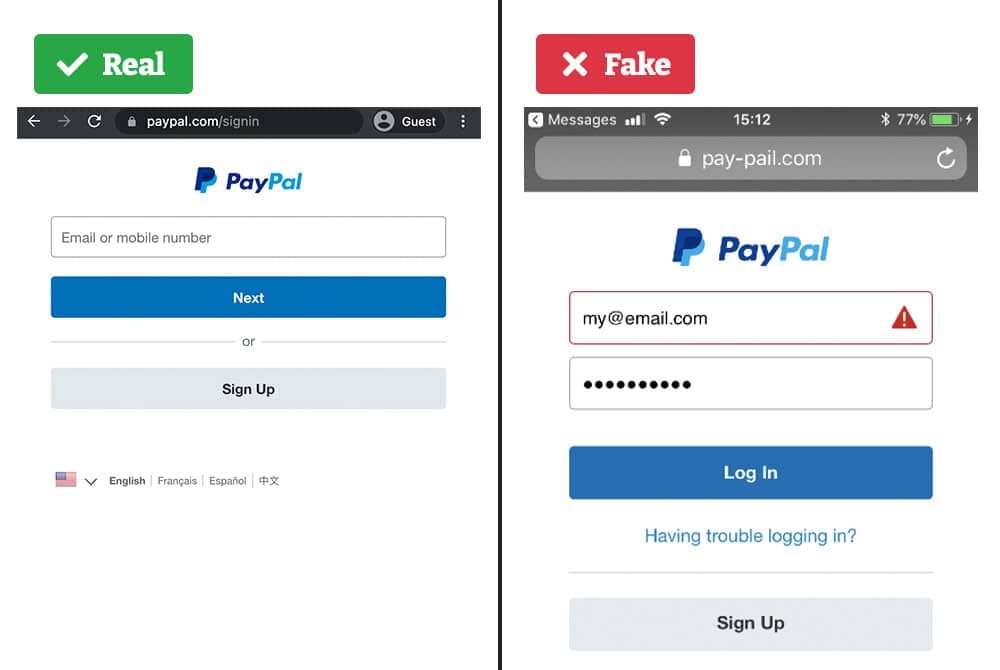
You can tell the URL of the fake login has a spelling typo.
2.) Malware: Trojans, keyloggers, remote access
Malicious software installed on a device steals files, records keystrokes, or gives attackers remote control.
Example: Someone downloads a “free” cracked app or PDF that silently installs a keylogger; later the attacker collects passwords and account data.
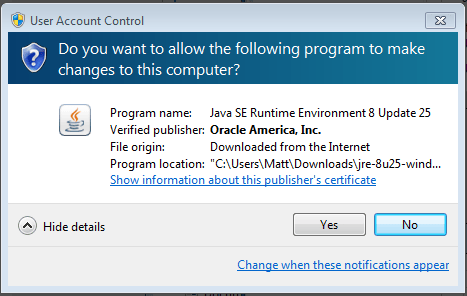
Malicious software may ask you to make changes to your computer
3.) Public Wi-Fi / Man-in-the-Middle (MITM) attacks
On unsecured networks, attackers intercept traffic between your device and the internet and can capture credentials or session tokens.
Example: You sign into an email account on an open café Wi-Fi and an attacker on the same network captures the login session.
4.) Social engineering & impersonation
Attackers manipulate people directly (calls, texts, DMs) to reveal secrets or perform actions that expose data.
Example: My grandpa in Hong Kong once received a call saying his son was in prison and needed money for bail. He went to withdraw cash, but the bank warned him it might be a scam. Fortunately he didn’t send the payment.
Practical ways to defend yourself
Don’t click links in unexpected emails or messages.
Hover to check the real URL. If it looks fishy, dont’t click on it.
Use a VPN
Personally, I use PeterVPN to keep my data safe whenever I’m on public Wi-Fi or other untrusted networks. Since it’s a simple Chrome extension, I can activate it in one click and instantly secure my connection.
With military-grade AES-256 encryption, PeterVPN keeps hackers from intercepting my traffic, and its no-log policy means my browsing data is never tracked or stored.
Also comes with a built-in ad blocker, which means fewer trackers following me around the web. That’s an extra layer of privacy most VPNs don’t include.
👉 If you’d like to try it, my readers get 20% off PeterVPN with this link: petervpn.com/ref/SATSITES
Only download apps/files from official stores or trusted sites.
Avoid “cracked” software.
Keep your OS and apps updated and run reputable antivirus/anti-malware scans when unsure.
Reader’s Spotlight 🌟
Looking for advice on business strategy, marketing, and the habits you need to be successful? Check out Business Deconstructed — a weekly newsletter with lessons from an entrepreneur building alongside you. Sign up today and get a free copy of How to Build a Business From $0.
Takeaways
Hackers have countless tricks up their sleeve, but a few smart habits can make a huge difference.
Using strong, unique passwords, staying alert for scams, and protecting yourself on public Wi-Fi with a VPN are simple steps that go a long way in keeping your data safe.
Small actions today can mean big privacy wins tomorrow.
If you know someone who could use this advice, forward this newsletter their way.
I’ll see you next week with more tips to keep your digital life secure 👋
Saturday Sites
Links to related articles: